codemelted.rs: The Swiss Army Knife Full Stack Solution

 codemelted.rs: The Swiss Army Knife Full Stack Solution
BY: Mark Shaffer / LAST UPDATED: 2026-FEB-01
“Write once, run anywhere (WORA)” was the famous slogan made by Sun Microsystems in 1995. At the time, this technology allowed for easy full stack engineering allowing you to target dedicated workstations and on-premises servers. So long as a Java Runtime Environment existed, you could run your code. Java was unable to keep to their slogan as web browsers became more advanced, mobile devices became ubiquitous, and companies no longer required dedicated servers.
As a full stack software engineer, I have had the privilege to work on technologies ranging from mainframes, custom built hardware from the 1980s, communications with satellites in space to data communication over Wide Area Networks. C, C++, and Java were the main drivers for this experience to include some FORTRAN and IBM Assembly 370. I also had the privilege to work on embedded systems utilizing different real-time operating systems as part of this wider communication systems experience.
Then came the secondary part of my career entering the commercial world. My full stack experience needed to evolve as Java was no longer enough. Instead of dedicated backend servers, there are now cloud services, and the web made the ultimate application as a service runtime for reaching customers. As long as a device has a browser, the user can reach your app. While professionally my work has been in mobile app development, the technologies I learned along the way has led to learning other technologies for fulfilling my passion to deliver the greatest customer reach for software engineers.
Enter the codemelted.rs project. The aim of this project is to deliver a Swiss Army Knife module to aid software engineers in building full stack solutions for their applications. Utilizing the Rust programming language, the module serves as a backbone to engineer solutions for multiple build targets. The module serves as a consumable crate for software engineers to build their own custom backend / desktop services applications. Secondly built into the module is a Command Line Interface (CLI) to target script based solutions with a powerful CLI that will work the same regardless of the operating system. Lastly the codemelted.rs along with the codemelted.js module will provide a buildable Rust to JS binding. These modules combined will allow for full Rust native and web application services and solutions.

Hope you enjoy the content. Any support is greatly appreciated. Thank you! 🙇
- 2026-FEB-01 (M. Shaffer): Updated to the focused work of building the codemelted CLI tool, the definition of the NPU, and continued development of the
codemelted.jsto ready it as a bindable module within thecodemelted.rsmodule. - 2025-NOV-16 (M. Shaffer): Updated chapters to reflect the full structure of the Swiss Army Knife approach. Updated Section 3 Command Line Interface with the current working CLI implementation and where it will be evolving.
- 2025-OCT-12 (M. Shaffer): Cleanup of the sections to reflect current work. Refactored current Raspberry Pi information into the section 6.0.
- 2025-AUG-06 (M. Shaffer): Initial release of the document refactoring from the original codemelted-dev (discontinued) concept and now focusing on this more targeted solution.
1.0 Functional Decomposition

Table of Contents
1.1 Model Breakdown
1.1.1 Domain Use Cases
- Async: Asynchronous processing both on a main thread, via background threads, repeating timers, and a dedicated worker provides a software engineer the ability to schedule work in a way to run more then one task efficiently.
- Console: Provides a set of STDIN / STDOUT functionality to build an interactive terminal application without a dedicated UI.
- DB: Provides the mechanism for building out an embedded database solution specific to the chosen SDK environment for the language to store complex data structures.
- Disk: Provides the functionality to work with and manage files on internal / external storage.
- HW: Provides the mechanisms to interact with hardware peripherals via Bluetooth, RS-232 serial ports, and USB connected to a system.
- JSON: JSON is the most common data format to work with for web technologies. This will provide all the mechanisms necessary to work with this data.
- Logger: Provides a simple logging facility to STDOUT along with a log handler callback capability for further processing in production.
- Monitor: Running a dedicated application or service necessitates the ability to monitor the host operating environment. This will establish those monitoring capabilities.
- Network: The internet is how apps communicate. This will provide access to web technologies to facilitate this communication.
- NPU: Stands for Numeric Processing Unit, this will be where all the math is at. Applications need to crunch numbers. This will provide that functionality.
- Process: Provides the interface to interact with host operating system programs as one-off / bi-directional dedicated processes.
- Runtime: Provides the ability to query common properties of the host operating system along with SDK specific hookups for the given runtime.
- Storage: Provides the ability to store data in key / value pairs of strings.
- UI: Identifies the items necessary for the SDK to build either a Graphical User Interface (GUI) or a Terminal User Interface (TUI) to interact with users and provide media capabilities (audio, gaming, video, etc). This establishes UI design goals but is highly tailored to the SDK.
1.1.2 Build Targets
- Command Line Interface (CLI): The
codemeltedCLI will be an installable program to facilitate actions on an operating system via the terminal. It is developed as part of thecodemelted.rsmodule to support the overall codemelted crate actions and to support terminal scripting capabilities. - Native App / Service: The codemelted crate will provide functions that implement the domain use case in its simplest form allowing software engineers the ability to design whatever native app or service they need. A software engineer can also build desktop / mobile applications utilizing the the TAURI crate in combination with the
codemelted.jsmodule rust binding. - WebAssembly (WASM): With the
codemelted.rsmodule utilizing bindings of thecodemelted.jsmodule, full web-stack solutions can be built with Rust and utilized in multiple JavaScript runtimes (Bun / Deno / NodeJS / Web) as a WASM compiled module.
1.2 Why Rust?
The codemelted.rs module will be an installable crate that provides the full native speed of a C/C++ application but with modern language constructs and memory safety. While C/C++ still has its place in application development, memory safety proves to be the #1 attack vector of hackers. Rust was designed to address those shortcomings and is an ideal choice to eliminate that attack vector. It also provides modern tooling for fully documenting your end product.
The combination of all these targets provides a software engineer a singular solution for the entire full stack. From Internet of Things (IoT), applications / services, and PWAs, everything a software engineer needs in one swiss army knife solution 🙂.
1.3 General Design Notes
1.3.1 Protocol Handlers
---
title: Protocol Handlers
---
classDiagram
  direction LR
  class CProtocolHandler {
    get_message(request: String) Result
    id() String
    is_running() bool
    post_message(T) Result
    terminate()
  }
  class CBroadcastChannelProtocol
  class CBluetoothDeviceProtocol
  class CEventSourceProtocol
  class CProcessProtocol
  class CSerialPortProtocol
  class CUsbProtocol
  class CWebRTCProtocol
  class CWebSocketProtocol
  class CWorkerProtocol

  CBluetoothDeviceProtocol --|> CProtocolHandler: implements
  CBroadcastChannelProtocol --|> CProtocolHandler: implements
  CEventSourceProtocol --|> CProtocolHandler: implements
  CProcessProtocol --|> CProtocolHandler: implements
  CSerialPortProtocol --|> CProtocolHandler: implements
  CUsbProtocol --|> CProtocolHandler: implements
  CWebRTCProtocol --|> CProtocolHandler: implements
  CWebSocketProtocol --|> CProtocolHandler: implements
  CWorkerProtocol --|> CProtocolHandler: implements
The above diagram reflects the basic construct for how protocols will be implemented within codemelted crate. The post_message() Result will signal success or error captured when attempting to communicate with the given protocol.The get_message(request: String) Result will retrieve either data or any encountered errors with a given protocol. The is_running() bool will reflect whether the protocol is still running or has been terminated.
Lastly the terminate() will close and cleanup any protocol forcing the creation of a new protocol object. These objects will open / connect upon creation via a codemelted crate function. The get_message() / post_message() will serve not only as a communication / retrieval of data but also as a command and control for a given protocol.
NOTE: The codemelted.js module will follow this design pattern as well but will adapt where necessary for the JavaScript language.
1.3.2 Module Organization
The codemelted.rs module and codemelted.js modules will be singular files that implement the identified domain use cases. They will be separated into major section blocks as shown below.
// ==================================================
// [ID] =============================================
// ==================================================
Function names will identify the domain use case followed by the action being taken. So for instance logger_log() is the logger use case logging function. Finally the naming conventions of functions, variables, and classes will follow the naming conventions of the Rust language. That means snake_case for functions and parameters and CamelCase for struct / object names.
NOTE: Enums will follow CamelCase for codemelted.rs while the codemelted.js module will utilize ALL_CAPS.
1.3.3 Module Versioning
The versioning of modules will be captured via the languages SDK versioning method. It will utilize a modified semantic versioning X.Y.Z with the following rules for the numbering scheme for the module.
- X: Year of release. Each new year resets the
Y.Zvalues to0 - Y: Breaking change to one of the use case functions or upgrade of dependencies requiring considerations within an app. A change in this value resets
.Zto0. - Z: Bug fix, new use case function implemented, or expansion of a use case function. Continuously updated by adding one with each new release unless reset by
X.Ychanges.
1.3.4 Error Handling
Failed use case functions will result in failure state via a Result object construct. Any violation of the module use case function API will result in either a panic! when it comes to codemelted.rs or thrown SyntaxError for codemelted.js indicating what was violated.
NOTE: The codemelted.js will implement a Result type object construct.
2.0 Domain Use Cases
Table of Contents
- 2.0 Domain Use Cases
- 2.1 Async Use Case
- 2.2 Console Use Case
- 2.3 DB Use Case
- 2.4 Disk Use Case
- 2.5 HW Use Case
- 2.6 JSON Use Case
- 2.7 Logger Use Case
- 2.8 Monitor Use Case
- 2.9 Network Use Case
- 2.10 Numeric Processing Unit (NPU) Use Case
- 2.11 Process Use Case
- 2.12.0 Runtime Use Case
- 2.13.0 Storage Use Case
- 2.14 UI Use Case
2.1 Async Use Case
According to Wikipedia
a thread of execution is the smallest sequence of programmed instructions that can be managed independently by a scheduler, which is typically a part of the operating system. In many cases, a thread is a component of a process.
What this is stating is that two sets of synchronous execution can occur in parallel. This can be accomplished in two forms with many programming languages, a supported thread construct for the given language or communicating with other operating system processes (typically another program / service).
According to MDN,
Asynchronous software design expands upon the concept by building code that allows a program to ask that a task be performed alongside the original task (or tasks), without stopping to wait for the task to complete. When the secondary task is completed, the original task is notified using an agreed-upon mechanism so that it knows the work is done, and that the result, if any, is available.
This basically means the ability to not run code in parallel but instead time slice a main thread to run different tasks where the notification on one task completing kicks off another work task. The Async Use Case will implement both concepts playing to the overall strengths of each programming language SDK.
2.1.1 Acceptance Criteria
- The Async Use Case will support the ability to sleep a given task in milliseconds.
- The Async Use Case will support the scheduling of a task that can take data (if required) and run to completion returning a result of the processing.
- The Async Use Case will support the starting of a timer that repeats a specified task on a regular interval until stopped.
- The Async Use Case will support the ability to start a background worker that has the ability to queue up work tasks in a first in first out (FIFO) order and receive the results of the completed tasks. The returned object will be a Protocol Handler object.
2.1.2 Design Notes
---
title: Result Objects
---
classDiagram
  class CResult {
    +is_ok() bool
    +is_error() bool
    +error() string
    +ok() any
  }
  class CTaskResult {
    +has_completed() bool
    +async result(): CResult
  }
  class CTimerResult {
    +stop()
  }
  CTaskResult --|> CResult: creates
2.2 Console Use Case
The console as described by Microsoft,
is an operating system window where users interact with the operating system or with a text-based console application by entering text input through the computer keyboard, and by reading text output from the computer terminal.
Mainly it represents a user interacting with a console application via a terminal shell. Once executing the console-based application, the user will be prompted / informed via STDOUT and enter data via keyboard STDIN. Closure of the console application is either via prompt or a <ctrl> c keystroke.
NOTE: In this context, the console application is an interactive application via STDIN / STDOUT. It is not a dedicated Textual User Interface (TUI) or a shell command where the interaction while still via the terminal shell, is kicked off with arguments passed, and completes its work bringing the user back to the shell prompt.
2.2.1 Acceptance Criteria
- The Console Use Case will support an “Alert” feature that writes a custom message to STDOUT and waits for a user to press the “ENTER” via STDIN before continuing.
- The Console Use Case will support a “Confirm” feature that writes a custom message to STDOUT and wait for a user to answer a
[y/N]prompt via STDIN before continuing. The return will be a Boolean true for any truthy confirmation. - The Console Use Case will support a “Choose” feature that presents an array of choices to STDOUT and waits for a user to select that choice via STDIN before continuing. The return will be an int representing the selected index. Invalid selections will re-prompt the choices for selection until a valid choice is made.
- The Console Use Case will support a “Password” feature that writes a custom message to STDOUT and waits for a user to enter their password via STDIN reflecting none of the typed characters. The return will be a String of the entered password.
- The Console Use Case will support a “Prompt” feature that writes a custom message to STDOUT and waits for a user to enter prompt via STDIN reflecting the typed characters. The return will be a String of the entered prompt.
- The Console Use Case will support a “Write” feature that will write data to STDOUT without a newline character. Every call to this will continue to write data to STDOUT on the same line.
- The Console Use Case will support a “WriteLn” feature that will write data to STDOUT with a newline character.
2.2.2 Design Notes
---
title: Console Use Case "Choose" Logic
---
stateDiagram-v2
  direction LR
  loop : While not a valid selection
  header : Present header
  choices : Present choices
  selection : Get selection
  state if_state <<choice>>
  [*] --> loop
  loop --> header
  header --> choices
  choices --> selection
  selection --> if_state
  if_state --> [*] : valid selection
  if_state --> loop : invalid choice
2.3 DB Use Case
According to Wikipedia,
In computing, a database is an organized collection of data or a type of data store based on the use of a database management system (DBMS), the software that interacts with end users, applications, and the database itself to capture and analyze the data. The DBMS additionally encompasses the core facilities provided to administer the database. The sum total of the database, the DBMS and the associated applications can be referred to as a database system. Often the term “database” is also used loosely to refer to any of the DBMS, the database system or an application associated with the database.
For this particular use case, the organized collection will be segmented into two types of databases. The first is a relational embedded database via SQLite for Rust. The seconds is an indexed database (i.e. no SQL) via the Web Browser APIs.
2.3.1 Acceptance Criteria
- The DB Use Case will support a manage feature to allow for altering the structure of the database. A true / false will be returned to indicate success or failure.
- The DB Use Case will support a query feature to allow for getting data from the database. The data will be held in an array like structure tailored for the database technology.
- The DB Use Case will support an update feature to allow for adding / updating / deleting data within the database. An integer will be returned indicating how many records within the database were updated.
- Any failure of the transactions above will result in a thrown
SyntaxErrororpanic!as it will be a violation of database rules.
2.3.2 Design Notes
---
title: DB Use Case "Transaction" Logic
---
stateDiagram-v2
  direction LR
  connect : Connect to database.
  transaction : Carry out database transaction.
  state if_state <<choice>>
  result : Return data result of the transaction.
  error : Throw SyntaxError indicating database violation.
  [*] --> connect
  connect --> transaction
  transaction --> if_state
  if_state --> result : No database violation
  if_state --> error : Database violation
  result --> [*]
  error --> [*]
Local DB Instances
- Browser Runtime (JS Web): Will utilize IndexDB NoSQL database available in web browsers.
- Rust (Native Compiled): Will utilize sqlite3 embedded database.
2.4 Disk Use Case
Regardless of where you run your application you will need the ability to store data. The host operating system provides access to be able to manage such files. The Disk Use Case will provide the ability to read / write file content to disk. It will also support the ability to manage these files on disk allowing for the creation of files, deletion of files, the ability to rename the files, and to delete such files.
2.4.1 Acceptance Criteria
- The Disk Use Case will support the reading of an entire file from the hosted operating system disk. This will be read either as a string or a binary blob.
- The Disk Use Case will support writing an entire file to disk from either a String or binary Blob. This will support either creation of a file or appending to an existing file.
- The Disk Use Case will support copy files / directories from one location to another on the hosted operating system disk.
- The Disk Use Case will support detecting whether a file or directory exists on the hosted operating system disk.
- The Disk Use Case will support listing of files / directories on the hosted system disk.
- The Disk Use Case will support creation of directories on the hosted system disk.
- The Disk Use Case will support moving files / directories from one location to another on the hosted operating system disk.
- The Disk Use Case will support removing files / directories from the hosted operating system disk.
- The Disk Use Case will support getting the size of files / directories from the hosted operating system disk.
- Success / Failures of any of the above transactions will be captured in a Result object.
2.4.2 Design Notes
None.
2.5 HW Use Case
According to Wikipedia for the hardware of interest.
Bluetooth Low Energy (Bluetooth LE, colloquially BLE, formerly marketed as Bluetooth Smart) is a wireless personal area network technology designed and marketed by the Bluetooth Special Interest Group (Bluetooth SIG) aimed at novel applications in the healthcare, fitness, beacons, security, and home entertainment industries. Compared to Classic Bluetooth, Bluetooth Low Energy is intended to provide considerably reduced power consumption and cost while maintaining a similar communication range.
A serial port is a serial communication interface through which information transfers in or out sequentially one bit at a time. This is in contrast to a parallel port, which communicates multiple bits simultaneously in parallel. Throughout most of the history of personal computers, data has been transferred through serial ports to devices such as modems, terminals, various peripherals, and directly between computers.
Universal Serial Bus (USB) is an industry standard, developed by USB Implementers Forum (USB-IF), for digital data transmission and power delivery between many types of electronics. It specifies the architecture, in particular the physical interfaces, and communication protocols to and from hosts, such as personal computers, to and from peripheral devices, e.g. displays, keyboards, and mass storage devices, and to and from intermediate hubs, which multiply the number of a host’s ports.
The HW Use Case will support these different hardware types. Each of them is similar in terms of how you interact with them. You must first scan for devices connected to the host operating system. Once you identify the hardware you want, you connect to it. Once connected, you are able to read / write data with the hardware until you close the connection. This use case will facilitate this transactions.
2.5.1 Acceptance Criteria
- The HW Use Case will provide the ability to scan for connected hardware devices based on the hardware type. The result will be a list of connected devices one can open a connection.
- The HW Use Case will provide the ability to open a connection to a hardware device. The result will be a Protocol Handler to facilitate reading and writing data to the hardware until disconnected. Failed connections will result in a NULL return.
- The HW Use Case will provide the ability to query the current device location and orientation in 3D space.
2.5.2 Design Notes
None.
2.6 JSON Use Case
According to Wikipedia,
“JSON (JavaScript Object Notation) is an open standard file format and data interchange format that uses human-readable text to store and transmit data objects consisting of name–value pairs and arrays (or other serializable values). It is a commonly used data format with diverse uses in electronic data interchange, including that of web applications with servers. JSON is a language-independent data format. It was derived from JavaScript, but many modern programming languages include code to generate and parse JSON-format data. JSON filenames use the extension .json.
The JSON Use Case will provide the functions necessary to facilitate working with the JSON format. This includes data validation, translating between supported data types, creating the SDK language JSON compliant format, parsing of strings to JSON, and stringify the JSON object to a serialized JSON string.
2.6.1 Acceptance Criteria
- The JSON Use Case will support the translation of Strings to the appropriate JSON data types. Failure to perform such a translation will result in a NULL (whatever that means in the given SDK language).
- The JSON Use Case will support the checking of variable data types to ensure that dynamic type data is as expected. This will support Boolean true / false returns along with the ability to throw an exception.
- The JSON Use Case will support the creation on JSON compliant arrays and objects to support later JSON stringify.
- The JSON Use Case will support the ability to check a JSON object containing expected keys. This will support Boolean true / false returns along with the ability to throw an exception.
- The JSON Use Case will support the parsing of a JSON string into a JSON compliant object. Failure to perform the parse will result in a NULL (whatever that means in the given SDK language).
- The JSON Use Case will support the stringify of a JSON compliant object to produce a JSON serialized string. Failure to perform the parse will result in a NULL (whatever that means in the given SDK language).
- The JSON Use Case will support the validation of URL strings. This will support Boolean true / false returns along with the ability to throw an exception.
2.6.2 Design Notes
None.
2.7 Logger Use Case
The most tried and true method of performing application diagnostics is logging. While Integrated Development Environments (IDEs) provide many tools to aid in development, logging captures what is happening within your application when a bug arises. And at the end of the day, bugs will always occur. To that end, the Logger Use Case represents a simple logging facility to STDOUT supporting four log levels.
The four log levels are DEBUG, INFO, WARNING, and ERROR. The STDOUT logging can aid while the application is being developed. Additionally, the Logger Use Case will provide a logged event handler that allows expanding on this logging facility to attach other processing. This can be as simple as logging to file to logging events to log server. You can decide.
2.7.1 Acceptance Criteria
- The Logger Use Case will provide the ability to log to STDOUT supporting the logging levels of DEBUG, INFO, WARNING, and ERROR. The log format will be
TIMESTAMP [LEVEL]: MESSAGE. - The Logger Use Case will support the setting of the given log level where logged events that don’t meet that log level are not processed. It will also provide the ability to turn off the logging altogether.
- The Logger Use Case will support the attaching of a Logged Event Handler to process logged events once they are logged to STDOUT.
2.7.2 Design Notes
---
title: Log Message Flow
---
stateDiagram-v2
  direction LR
  state is_logging_off <<choice>>
  build : Build log record.
  state is_log_level <<choice>>
  log : Write log record to STDOUT.
  state is_log_handler <<choice>>
  handler : Send log record to log handler for further processing.
  [*] --> is_logging_off
  is_logging_off --> build : logging is on
  is_logging_off --> [*] : logging is off
  build --> is_log_level
  is_log_level --> log : log record meets log level
  is_log_level --> [*] : log record does not meet log level
  log --> is_log_handler
  is_log_handler --> handler : log handler set
  is_log_handler --> [*] : no log handler
  handler --> [*]
2.8 Monitor Use Case
The ability to measure aspects of the host computer / operating system of a developed application is key in identifying metrics that can point to issues with the host system. The Monitor Use Case identifies the different areas of a host system typically measured and analyzed to identify potential problem areas or areas for improvement.
2.8.1 Acceptance Criteria
- The Monitor Use Case will provide the ability to measure attached hardware components reporting their current temperature in Celsius, its max temperature, and critical failure temperature.
- The Monitor Use Case will provide the ability to report on attached disks to the host operating system reporting the name, available bytes, used bytes, total bytes, load percentage, file system, is it read only, what kind, and mount point.
- The Monitor Use Case will provide the ability to report on the network of the host operating system identifying names, mac address, mtu, total received / transmitted bytes, total received / transmitted errors, and total received / transmitted packets.
- The Monitor Use Case will provide the ability to measure the host computers overall performance via CPU load (as measured across all CPUs), available RAM in bytes, free RAM in bytes, used RAM in bytes, total RAM in bytes, total RAM load percentage, SWAP free bytes, SWAP used bytes, SWAP total bytes, and the SWAP load percentage.
- The Monitor Use Case will provide the ability to measure the currently running host operating system processes identifying each process by PID, CPU load percentage, current working directory, total read bytes from disk, total written bytes to disk, the executable path, group id, RAM usage in bytes, RAM virtual usage in bytes, name of the process, how many open files, any parent PID, path root directory, session id, status of the running process, time started in seconds, time running in seconds, and the user id of the process. It will also provide the ability to kill and wait for process completion.
- The Monitor Use Case will provide the ability to monitor open network connections organized by TCP or UDP.
- The Monitor Use Case will provide the ability to troubleshoot networks via PING / TRACE ROUTES / configured network interfaces on the platform.
- Each of the monitoring capabilities above will provide the ability to save the monitored data into a textual based format and run in the background as setup by the software engineer.
2.8.2 Design Notes
None.
2.9 Network Use Case
According to Cloudflare,
“the open systems interconnection (OSI) model is a conceptual model created by the International Organization for Standardization which enables diverse communication systems to communicate using standard protocols. In plain English, the OSI provides a standard for different computer systems to be able to communicate with each other. The OSI Model can be seen as a universal language for computer networking. It is based on the concept of splitting up a communication system into seven abstract layers, each one stacked upon the last.
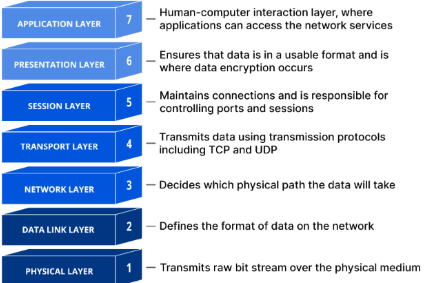
The Network Use Case will facilitate several protocols that fit this model.This will be network protocols to communicate with servers or amongst other web apps for the frontend. For the backend, it will be to support the server side protocols for the client-side network protocols to connect.
2.9.1 Acceptance Criteria
- The Network Use Case will support the ability to fetch data from RESTful APIs. The response will include http status code and the particular data received.
- The Network Use Case will support the ability to broadcast messages between web apps and services.
- The Network Use Case will support the client network protocols of Server Sent Events, Web Sockets, and WebRTC.
- The Network Use Case will support the ability to act as a server for the network protocols of HTTP and Web Sockets and Web RTC.
2.9.2 Design Notes
None.
2.10 Numeric Processing Unit (NPU) Use Case
According to Wikipedia,
A floating-point unit (FPU), numeric processing unit (NPU), colloquially math coprocessor, is a part of a computer system specially designed to carry out operations on floating-point numbers. Typical operations are addition, subtraction, multiplication, division, and square root.
The NPU Use Case will build upon this idea by setting up a collection of mathematical formulas for execution. These will range the gambit of typical formulas a developer may encounter. Furthermore, a compute capability will also exist to carry out complicated computations that involve more than a standard mathematical formula.
2.10.1 Acceptance Criteria
- The NPU Use Case will support the execution of mathematical formulas by providing a selection of said formula and passing the arguments necessary to complete the calculation. Mismatched arguments will result in an exception. Failed calculations (i.e. square of negative number, etc.) will result in a NAN return.
- The NPU Use Case will support the ability to compute (i.e. series of computations) and return the result. The communication method of this capability will be JSON compliant data for both the request and result of the run. Unknown requests will be handled as an exception.
2.10.2 Design Notes
None.
2.11 Process Use Case
According to Wikipedia,
In computing, a process is the instance of a computer program that is being executed by one or many threads. There are many different process models, some of which are light weight, but almost all processes (even entire virtual machines) are rooted in an operating system (OS) process which comprises the program code, assigned system resources, physical and logical access permissions, and data structures to initiate, control and coordinate execution activity. Depending on the OS, a process may be made up of multiple threads of execution that execute instructions concurrently.
This use case will facilitate the functionality to detect installed programs, run one off command to gather outputs, and setup a bi-directional STDIN / STDOUT dedicated process your program can communicate.
2.11.1 Acceptance Criteria
- The Process Use Case will support the ability to detect if a command exists with the host operating system.
- The Process Use Case will support the ability to run a one-off command and capture its STDOUT / STDERR output.
- The Process Use Case will support the ability to run a bi-directional command that is communicated with via STDIN / STDOUT / STDERR until command to end its processing
2.11.2 Design Notes
None.
2.12.0 Runtime Use Case
According to Tech Target:
Runtime is a piece of code that implements portions of a programming language’s execution model. In doing this, it allows the program to interact with the computing resources it needs to work. Runtimes are often integral parts of the programming language and don’t need to be installed separately.
The Runtime Use Case will provide queryable actions common between all the runtimes for the chosen languages models. It will then implement SDK specific functions to fully exercise the availability of functionality for a chosen SDK programming language.
2.12.1 Acceptance Criteria
- The Runtime Use Case will provide the following queryable actions. Failed queryable values will result in a minimum value or UNDETERMINED if a String return:
- CPU architecture
- Number of CPUs
- Environment variables
- User’s home directory
- Hostname
- Kernel version
- Online access to the Internet
- OS name
- OS version
- Path separator
- Temp path
- User name
- The Runtime Use Case will provide access to SDK language specific features not common between the chosen module languages. (i.e. Event attachment in JavaScript, etc.).
2.12.2 Design Notes
None.
2.13.0 Storage Use Case
The Storage Use Case will provide a mechanism similar to the Web Storage API. This is a simple string key / value pair storage mechanism. Developers will have the ability to set, get, and remove items from storage. They will also have the ability to clear the entire mechanism. For the JavaScript web runtime, a developer will have the option to not only utilize local (long term storage) but session and cookies as storage mechanisms. For Rust, the storage mechanism will mirror that of local storage and facilitate setting these values in memory while saving the storage as a file in the user’s HOME directory.
2.13.1 Acceptance Criteria
- The Storage Use Case will provide the ability to set a key / value string within storage.
- The Storage Use Case will provide the ability to get a value based on the key from storage. If the key does not exist, then NULL is returned.
- The Storage Use Case will provide the ability to remove a key / value from storage.
- The Storage Use Case will provide the ability to clear all entries from storage.
- The Storage Use Case will provide the ability to identify how many items exist within the storage.
2.13.2 Design Notes
---
title: Rust Update Logic
---
stateDiagram-v2
  direction LR
  request : Storage update request occurs.
  update_memory : Update storage in memory.
  update_disk : Update storage from disk to users home directory.
  [*] --> request
  request --> update_memory
  update_memory --> update_disk
  update_disk --> [*]
NOTE: The above demonstrates how Rust will match the Web Storage API.
2.14 UI Use Case
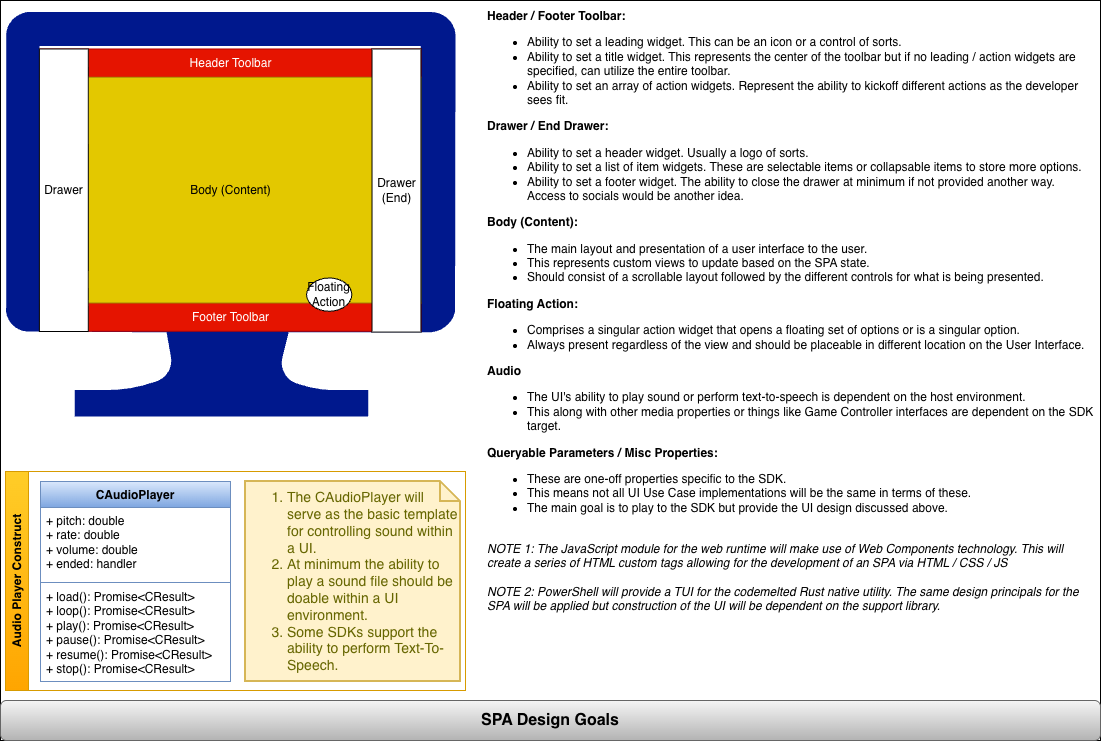
The UI Use Case is all about bringing a user interface to interact and present data. The modules will strive to deliver a Single Page App (SPA) view regardless of the technology. This will treat the user interface as a divided grid as shown below. The remaining items the UI Use Case will provide support the SPA and its transitions.
A dialog feature will provide the ability to alert (a.k.a. snackbar), close, confirm, choose, custom, load, open, and prompt, to get information from a user. This will be asynchronous by nature. The theme feature will aim to give a theme for the overall SPA with the ability to override for an individual widget. The widgets feature will allow for building the different controls and layouts for the SPA. Lastly an audio feature will provide the ability to play sounds and perform text to speech if available for the SDK language.
2.14.1 Acceptance Criteria
Not Applicable.
2.14.2 Design Notes
3.0 Numeric Processing Unit (NPU)
The npu_compute() and. npu_math() functions are implemented within the codemelted.rs and codemelted.js modules. They hold all computations executable by this project. The CMathFormula enumeration is what you utilize for the codemelted.rs rust module. The MATH_FORMULA enumeration is what is utilized for the codemelted.js module.
Table of Contents
3.1 Compute Functionality
The following sub-sections breakdown the npu_compute() function usage within the project’s primary modules.
3.1.1 Syntax
codemelted.js Module:
// Specify an Object literal request, receive a CResult object with a
// CObject held in the result() function.
let response = npu_compute(request);
codemelted.rs Module:
#![allow(unused)]
fn main() {
// Specify an CObject (a.k.a JsonValue) request,
// receive a Result object back with a CObject response if
// successful
let response: Result<CObject, std::io::Error> = codemelted::npu_compute(
  request: &CObject
);
}
3.1.2 Request Objects
TO BE DETERMINED
3.2 Math
3.2.1 Syntax
codemelted.js Module:
// Specify the MATH_FORMULA to execute and pass the arguments to
// the chosen formula to receive the answer.
let answer = npu_math({
  formula: MATH_FORMULA.TemperatureCelsiusToFahrenheit,
  args: [0.0]
});
NOTE: A SyntaxError is thrown if the arguments don’t match the necessary formula requirements.
codemelted.rs Module:
#![allow(unused)]
fn main() {
// Specify the CMathFormula to execute and pass the arguments to
// the chosen formula to receive the answer.
let answer: f64 = codemelted::npu_math(
  CMathFormula.TemperatureCelsiusToFahrenheit,
  &[0.0]
);
}
NOTE: A panic! occurs if the arguments don’t match the necessary formula requirements.
3.2.2 Formulas
The following CamelCase Formula entries correspond to the enumerations identified in 3.2.1 Syntax above. They also correspond to the formula one would specify for the codemelted CLI program.
| Formula | Description |
|---|---|
| TemperatureCelsiusToFahrenheit | °F = (°C x 9/5) + 32 |
| TemperatureCelsiusToKelvin | °K = °C + 273.15 |
| TemperatureFahrenheitToCelsius | °K = (°F − 32) × 5/9 + 273.15 |
| TemperatureFahrenheitToKelvin | °K = (°F − 32) × 5/9 + 273.15 |
| TemperatureKelvinToCelsius | °C = °K − 273.15 |
| TemperatureKelvinToFahrenheit | °F = (°K − 273.15) × 9/5 + 32 |
4.0 Command Line Interface (CLI)
 |
|
Table of Contents
4.1 codemelted (native command)
The codemelted command is a Rust compiled native CLI program available within the terminal of a given operating system. It’s goal is to facilitate common but different actions between operating systems. This means that regardless of the operating system, the action is carried out the same. For instance interacting with STDIN / STDOUT or working with files on disk. This allows for more easily working within the operating system’s terminal or native scripting language to facilitate those given actions. It will also provide more complex actions only available via a natively developed command.
4.1.1 Installation / Removal
Before being able to install the native codemelted command, you must install rust. To do so, follow the Install Rust to install the necessary rust compilers and toolchains. After that, execute the different command below.
- INSTALL:
cargo install codemelted - UPGRADE:
cargo upgrade --package codemelted - UPGRADE ALL:
cargo upgrade - UNINSTALL:
cargo uninstall --package codemelted
NOTE: The above will be installed via the 3.2 codemelted-cli (pwsh Core Module) if utilizing the pwsh Core terminal.
4.1.2 Commands
To access the help system after installation execute codemelted --help.
================================================================
codemelted Native Command - v26.0.0
================================================================

SYNTAX: codemelted [action] [params]

USAGE:
  --async-sleep [delay_in_millis]
      Will sleep for the specified milliseconds. Invalid entries
      will sleep for 0 ms.
  --console-alert [message]
      Pauses execution while reporting a message.
  --console-confirm [message]
      Provides a confirmation prompt via STDOUT with the answer
      being written to STDOUT as true / false.
  --console-choose [message] [choices]
      Provides a selection menu of the CSV choices waiting for
      a valid selection from the user with the chosen index
      written to STDOUT.
  --console-password [message]
      Provides a password prompt writing out the password to
      STDOUT.
  --console-prompt [message]
      Provides an input prompt writing out the answer to
      STDOUT.
  --console-writeln [message]
      Writes [message] to STDOUT with a newline.
  --npu-math [formula] [arguments]
      Writes the answer to the calculated formula w/ arguments.
  --help Prints this help system.

WEBSITE: https://rs.codemelted.com/
4.1.3 –async-* Actions
The only asynchronous action supported by the codemelted command is sleeping for a specified number of millisecond. Invalid entries will default to 0 and have no affect.
Example:
% codemelted --async-sleep 200
% _
Design Notes:
---
title: cli_async() Call Sequence
---
stateDiagram
  direction LR
  [*] --> main
  main --> cli_async
  cli_async --> async_sleep
  async_sleep --> [*]
4.1.4 –console-* Actions
The console represents interacting with a terminal user via STDIN (keyboard) / STDOUT (terminal output). The following sections break out the STDIN / STDOUT actions.
4.1.4.1 STDIN Actions
The following reflect actions to prompt the user for information to be entered in via STDIN and the answer reported via STDOUT. See 3.3 Scripting Language Note for how to capture that information within a script variable for later processing.
To ask a user for confirmation to a question. Returns to STDOUT are “true” for confirmation and “false” otherwise.
Example:
% codemelted --console-confirm "Are You Sure"
Are You Sure CONFIRM [y/N]: N
false
% _
To ask a user to make a choice selection from a CSV of options. Returns to STDOUT the “index” of the choice.
Example:
% ./codemelted --console-choose "A Pet" "bird,cat,dog,fish"
-----
A Pet
-----
0. bird
1. cat
2. dog
3. fish

Make a Selection: 2
2
% _
To prompt the user to enter in some general information. Entered value reported to STDOUT.
Example:
% ./codemelted --console-prompt "Login Username"

Login Username: Dave
Dave
% _
To request the user for a password that is not reflected while typing. Entered value reported to STDOUT.
Example:
% ./codemelted --console-password "Login Password"

Login Password:
password
% _
Design Notes:
---
title: Call Sequence
---
stateDiagram
  direction LR

  [*] --> main
  main --> cli_console
  cli_console --> console_confirm
  cli_console --> console_choose
  cli_console --> console_password
  cli_console --> console_prompt
  console_confirm --> [*]
  console_choose --> [*]
  console_password --> [*]
  console_prompt --> [*]
4.1.4.2 STDOUT Actions
To alert a user with a message and pause execution until the user presses enter.
Example:
% codemelted --console-alert "It's broken"
It's broken [ENTER]:
% _
To write a message to STDOUT without any user interaction.
Example:
% codemelted --console-writeln "Some information"
Some information
% _
Design Notes:
---
title: cli_console() Call Sequence
---
stateDiagram
  direction LR

  [*] --> main
  main --> cli_console
  cli_console --> console_alert
  cli_console --> console_writeln
  console_alert --> [*]
  console_writeln --> [*]
4.1.5 –npu-* Actions
To calculate an answer to a mathematical formula by specifying its arguments. The answer is then written to STDOUT.
Example:
% codemelted --npu-math TemperatureCelsiusToFahrenheit 0.0
32
% _
Design Notes:
---
title: cli_math() Call Sequence
---
stateDiagram
  direction LR
  [*] --> main
  main --> cli_npu
  cli_npu --> cli_compute
  cli_npu --> cli_math
  cli_compute --> [*]
  cli_math --> [*]
4.2 codemelted-cli (pwsh Core Module)
BEING DEVELOPED. SEE GITHUB REPO FOR PROGRESS.
4.3 Scripting Language Notes
TO BE DETERMINED.